




 Blog posts
 Events
 Cloudgov University

08:59 a.m. — Serenity
Keyboards clack, CI badges gleam green, the office espresso froths.
Jake, a junior data engineer fresh from onboarding, decides to sanity-check a huge table before tomorrow’s sprint review.
SELECT * FROM project_id.massive_table LIMIT 10;
Ten rows, two minutes—then breakfast. Easy.
09:07 — Shock
The CFO barrels into the bullpen. An iPad, thrust overhead, shows a single crimson number:
bigquery.googleapis.com $5,013.12
“Who just spent five thousand dollars before breakfast?”
Slack detonates:
-
- #finops-alerts → 1 PB queried! Refund?!
- #data-infra → Suspend all BigQuery jobs, triage now.
Jake’s face drains as the job history scrolls into view:
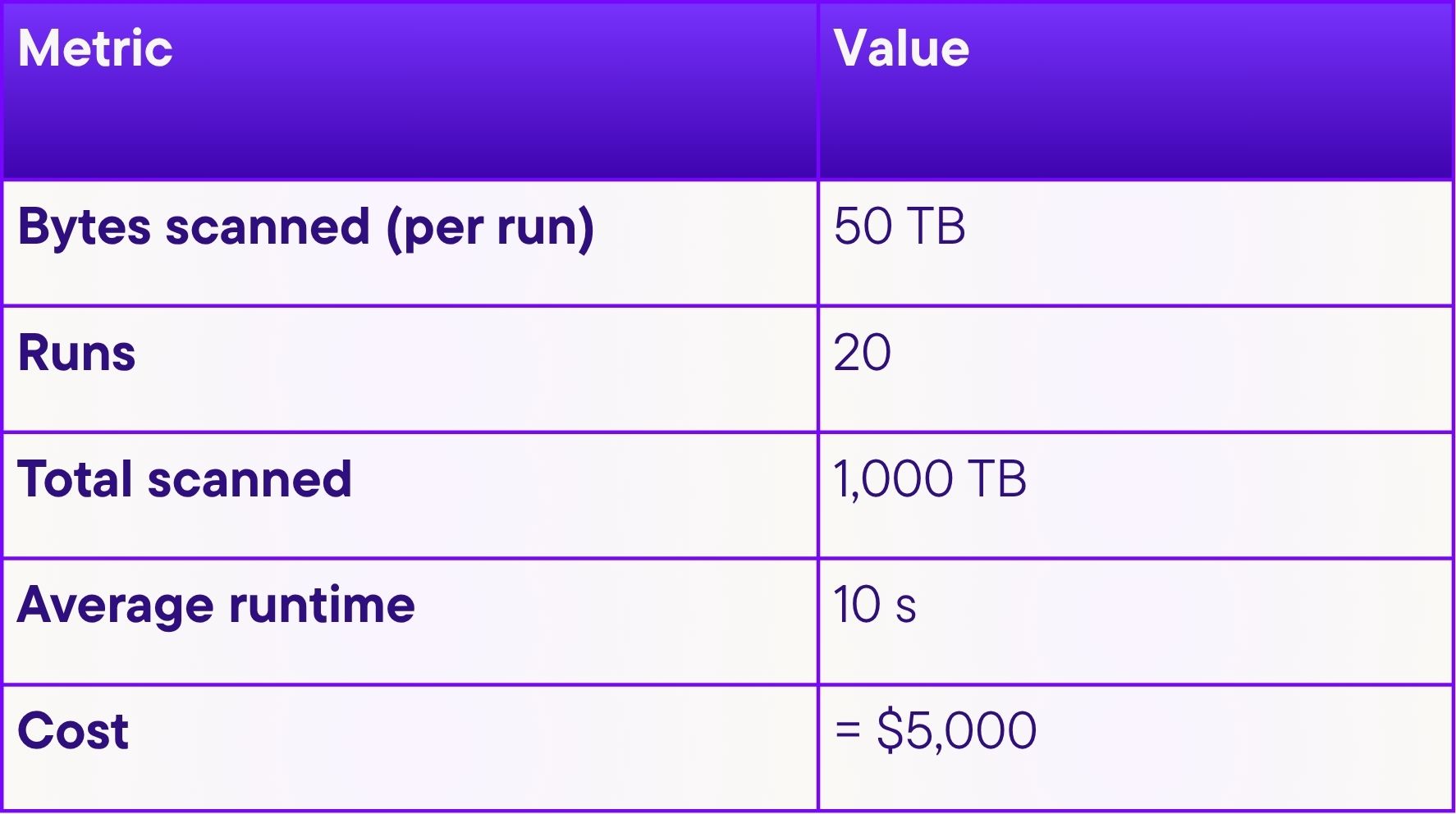
How Ten Rows Became One Petabyte
BigQuery’s DNA is columnar and parallel.
Each query is sprayed across thousands of worker slots.
-
- Slots scan only the columns you ask for — but
SELECT *requests them all. - A
LIMITis applied after the scan finishes; workers can’t stop early because they don’t yet know which slice of data will contain the “first” rows. - The platform is blisteringly fast—ten seconds to sweep a warehouse—but the meter spins at $5 per terabyte in on-demand mode.
- Slots scan only the columns you ask for — but
Jake’s twenty “little” tests silently inhaled a petabyte.
Why BigQuery Has Earned the Nickname BigWorry
-
- Unlimited by default. New projects inherit unlimited per-query byte quotas and no hard cost ceiling.
- Pay-per-byte surprises. Curious analysts intuitively trust
LIMIT 10; BigQuery does not. - Fine-print cost estimates. The console shows predicted bytes—but the text is easy to miss in a rush.
- Fast is dangerous. Ten-second runtime gives no time to notice the blast radius before the cash is burned.
Reddit is peppered with horror threads of $22k and $37k overnight bills. Jake’s story is simply the latest chapter.
09:12 — The Scramble
Incident channels buzz.
Senior SREs query INFORMATION_SCHEMA.JOBS_BY_PROJECT to locate every job scanning more than 1 TB.
A Cloud Billing export view confirms: the finance budget for the entire data org is already shot—and it’s still Monday.
Technical Deep-Dive: Guardrails the Team Wishes They’d Enabled

Behind the Curtain: Why SELECT * Is So Expensive
-
- Column Pruning: BigQuery only cracks open columns you list. Avoid
*. - Predicate Pushdown: Filters in a
WHEREclause allow workers to discard blocks early if the table is partitioned or clustered. - Bytes ≠ Rows: Wide columns of
VARCHARcan weigh more than millions of narrowINTrows. - Edition vs On-Demand: Since 2023, BigQuery offers slot pools with autoscaling bursts—often cheaper than raw on-demand for large, steady loads.
- Column Pruning: BigQuery only cracks open columns you list. Avoid
11:00 — The Blameless but Brutal Post-Mortem
The team lists every misstep:
-
- No dry-run culture — curiosity trumped caution.
- Zero byte caps —
maximum_bytes_billednever configured. - No dev vs prod separation — gigantic prod datasets open to ad-hoc pokes.
- Alerting at budget threshold, not per-query — by the time finance saw the spike, damage was done.
They vow it will never happen again—but manual vigilance is brittle. Enter automation.
Enter Cloudgov.ai — AI-Assisted FinOps Without the Fairy Dust
Cloudgov.ai can’t read minds or reverse bills, but it leverages every telemetry feed Google exposes:
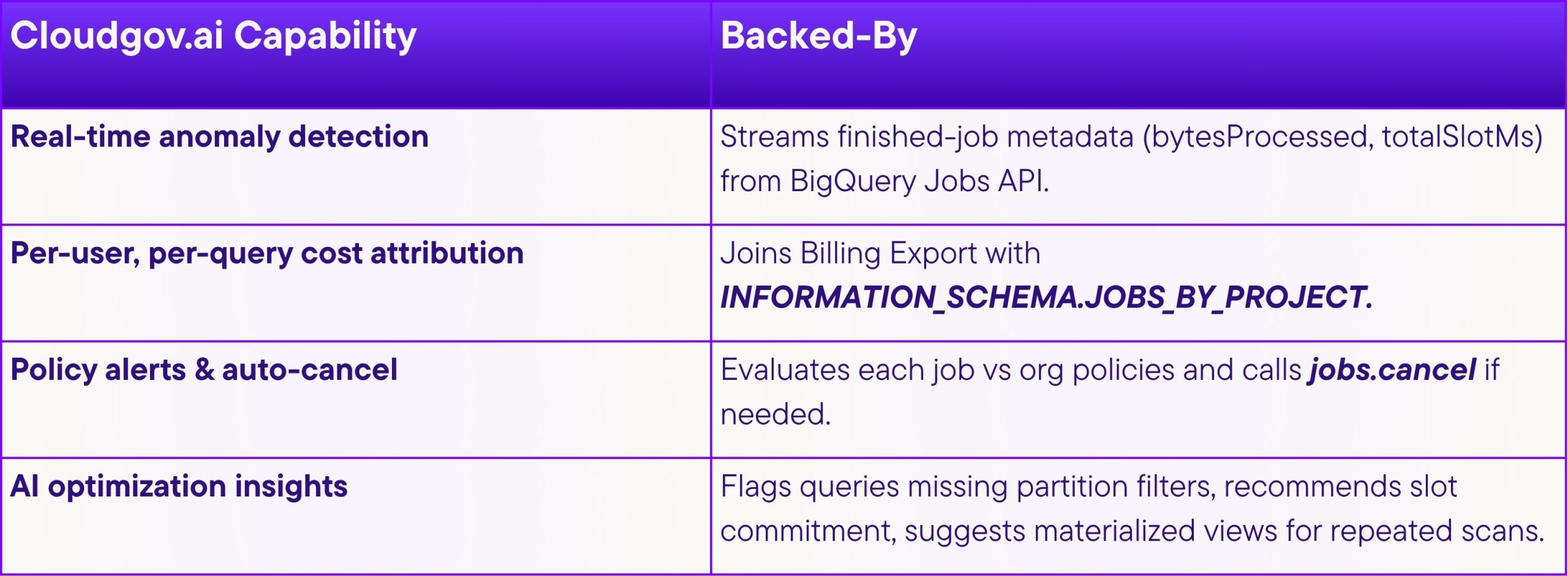
What Cloudgov.ai can’t do: alter your SQL or stop a job before it begins—that requires Google’s own guardrails.
What it can do: warn the moment BigQuery logs the job metadata, propose the safest next action, and give leadership instant clarity.
A Call to the BigQuery Team: Turn BigWorry Back into BigQuery
Dear Google engineers,
Your engine is magnificent, but default safety nets would save customers—and your brand—countless headaches.
-
- Non-zero project byte caps. Ship new projects with a conservative default.
- Prominent cost banners. A bright “Estimated Cost > $100” ribbon, not gray micro-text.
- SELECT-STAR safeguard. Block or challenge
SELECT *on tables > 1 TB unless partition filter present. - One-click Dev Mode. Give newcomers a sandbox with 10 GB hard limits.
Help us help ourselves—every surprise invoice erodes trust in the cloud model we all champion.
Signed,
Every engineer who has ever typed a query in fear.
18:30 — Epilogue
Jake’s pride is bruised but intact.
The team now runs a dry-run linter in CI.
Every BigQuery client library call sets maximum_bytes_billed.
And Cloudgov.ai posts a friendly Slack ping whenever someone’s experiment nudges the danger zone.
With Cloudgov.ai’s cost governance AI, it’s finally safe to put the pedal down without torching the corporate card.
Sources
- BigQuery Best Practices – Estimate & Control Costs
- BigQuery Pricing – $5 / TB On-Demand
- BigQuery Quotas & Limits
- Job Config maximum_bytes_billed
- Controlling BigQuery Costs (GCP Blog)
- Clustered Tables & Block Pruning
- Budgets & Alerts – Cloud Billing
- Dremel Paper (BigQuery Architecture)
- BigQuery Slot Reservations & Editions
- BigQuery INFORMATION_SCHEMA Introduction
- Dry-Run API Example